
The Clot Clot Club Banner - 2

Component

Content fragment component

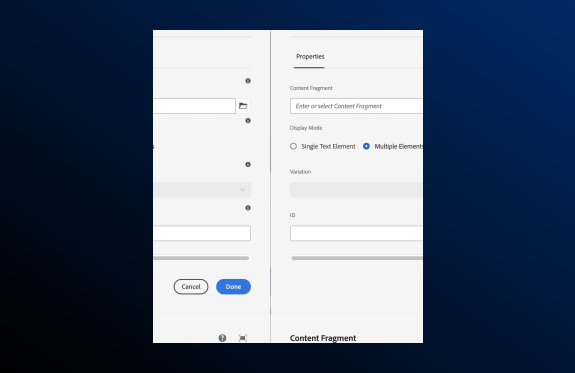
A user interface panel titled “Content Fragment.” The panel contains the following labeled fields and controls:  “Properties” and “Paragraph Control” sections. A dropdown labeled “Content Fragment” with the placeholder “Enter or select Content Fragment.” A “Display Mode” section with two radio buttons: “Single Text Element” (selected) and “Multiple Elements.” An “Element” dropdown labeled “Select.” A “Variation” field. An “ID” field. Two buttons at the bottom: “Cancel” and “Done.”

Content fragment overview

 The Content Fragment component allows authors to create and manage structured, reusable content that can be presented across multiple pages. It is ideal for maintaining consistency and reducing duplication for text-heavy or structured content. 

Usage

Use Content Fragments to manage and reuse structured content across different templates and channels. They are particularly useful for editorial content, product descriptions, and clinical information.

Common usage includes:

  • Product detail pages 
  • Clinical detail pages 
  • Campaign landing pages 
  • Blog or article content

Dos and don'ts

Do:

  • Use for content that needs to be reused across multiple pages
  • Maintain a clear structure for easy updates
  • Apply appropriate metadata for search and categorization

Don’t:

  • Use for highly visual or design-heavy content
  • Overcomplicate fragment models with unnecessary fields
  • Ignore accessibility requirements for embedded content

Authoring


AEM guidelines

Content Fragment is available as a Core Component in AEM for support- structured content models. Content Fragments can be integrated with Experience Fragments for omnichannel delivery. 

For general information about the Content Fragment Core Component, refer to AEM’s Content Fragment  Component documentation.  


Accessibility


Related components