Item 1
Item 2
Item 1
Item 2
Item 3
Item 4
- Usage
- Variations
- Styles
- Content guidelines
- Accessibility
Usage
Accordions are a set of stacked headings that show and hide information in a small space. Information is sectioned under these headings.
Accordions are great for showing a lot of content in a small space. They can simplify a page’s layout and prevent cognitive overload.
However, accordions also hide content, which may lead to the user overlooking it. Use accordions when the user does not need to read through each section.
Common usage includes:
- Group related content into expandable panels
- Improve ability to scan page for FAQs or technical details
- Reduce cognitive load by hiding non-critical information until needed
Dos and don'ts
Do:
- Use if there is too much related information to show within a limited space
- Use if the information is overwhelming when displayed all at once
- Use if the information can be grouped into logical categories
- Use if the user does not need to see all the information at once
- Do use the following components within an Accordion — but only if there is enough space, and if the content makes it truly necessary:
- Text
- Title
- Image
Don’t:
- Use Accordion for critical information that must remain visible
- Do not select ‘Single item expansion’ checkbox — Accordions should always stay open until the user chooses to close them
- Do not use this component on assertive or accent container backgrounds
- Certain components that should never appear in an accordion. Do not add these components within the accordion panel:
- Accordion
- Breadcrumb
- Navigation
- Tabs
Use case consideration
The Tab and Accordion Components are similar ways of structuring information. Here are some guidelines for deciding when to use Tabs or Accordions in your use case, and when to consider another solution:
Use Accordions when:
- The content includes too much related information to show within a limited space
- The content is overwhelming when displayed all at once - accordions allow users to hide areas of content they are not presently focused on
- The content can be grouped into logical categories
- The user does not need to see all the information at once to complete their task
Use Tabs when:
- The content is limited to a small number of categories that are unlikely to change or expand
- The content needs a larger area or the whole page
- The categories should function more like navigation than a show / hide toggle
Use something else when:
- There is enough space to show the content all the time
- The content makes more sense to end users when viewed at once - for example, if they need all information simultaneously visible to make a decision
- Users are likely to read all the content
- The content cannot be logically grouped into tabs or accordions
- The total tab content slows the page’s performance
Example
Accordion panel content
Accordion panel content
Accordion panel content
Heading elements
The Accordion Title renders HTML heading elements — h2 (this is the default setting), h3, h4, h5, h6.
Variations
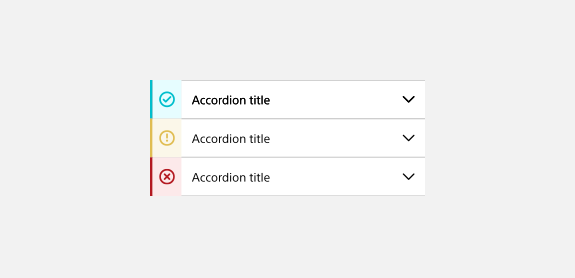
Stoplight accordion
Stoplight icon accordions are only used for safety ratings.
Styles
Styles are used to visually amplify the Boston Scientific brand. Styles carry different brand or functional treatments that bring a distinctive look to our webpages while also helping to emphasize key information.
Using the functional treatment
The functional treatment should be used to change the way a component operates to make it better fit the use case on a web page.
Top margin
Accordions with h2, h3, and h4 Titles have the same top margin, and accordions with h5 and h6 Titles have the same top margin. The top margin is applied to the top of the component.
Content guidelines
Content guidelines are principles to follow when writing digital content for Boston Scientific web pages. Following the principles ensures consistency, clarity, and quality.
Accordion content
Do:
- Keep headings short and clear, so users understand what is inside a closed accordion
- Ensure headings are mutually exclusive from each other - each one must be unique
- Word accordion headings within the same accordion group consistently
- Keep translation in mind when writing headings
- Write in sentence case
- Use accordions for simple content
- Group accordion content in logical categories
Don't:
- Add long headings
- Use accordions for small amounts of content
- Use accordions if the user needs to read all of the page’s content — if this is the case, focus on structuring and organizing your content for improved readability
Accessibility
This component passes AA WCAG standards. However, changes made by the content owner or implementer could impact accessibility compliance. Be sure to follow code standards, usage guidelines, and content guidelines to ensure that the tabs are fully accessible.
- Make sure each accordion panel has a unique and descriptive heading— this is necessary for users relying on assistive technologies to navigate
- Make sure that the content within the accordion panel is also fully accessible
For more information, see WAI-ARIA Authoring Practices for accordions and Deque’s screen reader keyboard shortcuts and gestures documentation.